

HOW TO OPEN A CUSTUMER ACCOUNT
Hello,
We are pleased to provide you with the procedure to set up your client access in the portal.
When creating your online account, please make sure to use the email address currently on file in your account.
Should you have any questions, please don’t hesitate to contact us, we will be happy to assist you.
Best regards.

STEP 1
Click on the link:
FIRST LOGIN / FORGOT PASSWORD


STEP 2
Enter the email address we have on file.
Once you have entered your email, click SEND.
A red message will appear confirming that a confirmation email has been sent to you.
You will receive an email containing a link to create your password. This link is valid for 60 minutes from the time you receive it.


STEP 3
Once finished, click CONFIRM.
A message will appear confirming that your password has been successfully created.
Click the red button: GO TO LOGIN PAGE
HOW TO OPEN A CUSTUMER ACCOUNT
Hello,
We are pleased to provide you with the procedure for paying your invoice online.
Please note that all invoices are generated on the 1st day of each month and are automatically sent to you by email.
If you wish to make a payment before the 1st of the month, it will be treated as an advance on your account. When your invoice is generated on the 1st, it will automatically be paid using the advance you have made (see details below).
If you make your payment on or after the 1st of the month, simply go to the Invoices tab and proceed with the payment directly.
In all cases, a payment confirmation will be automatically sent to you by email.
Should you have any questions, please don’t hesitate to contact us, we will be happy to assist you.
Best regards,
HOW TO OPEN A CUSTUMER ACCOUNT

(Click on the image to view it in full size)
STEP 1
For any payment made before the 1st day of the month, it must be processed as an advance on your account.
Once the invoice is generated on the 1st, it will automatically be paid using the advance you have made.
To proceed, please click on the Contracts / Reservations tab.

(Click on the image to view it in full size)
STEP 2
Next, please click on View / Add Advances to continue.
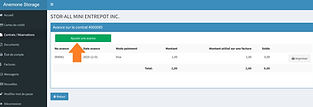
(Click on the image to view it in full size)
STEP 3
Next, please click on Add an Advance to continue.
INVOICE PAYMENTS

STEP 1
Invoices are generated on the 1st day of each month.
If you make your payment on or after the 1st of the month, please click on the Invoices tab.
(Click on the image to view it in full size)

(Click on the image to view it in full size)
STEP 2
Please click on the Invoices button to continue.